Why your cloud business needs FedRAMP certification

Now more than ever, FedRAMP certification will put your cloud services or SaaS solution head and shoulders above the competition.

Now more than ever, FedRAMP certification will put your cloud services or SaaS solution head and shoulders above the competition.

The Federal Risk and Authorization Management Program, or FedRAMP, was designed to support the federal government’s “cloud-first” initiative by making it easier for federal agencies to contract with vendors that provide SaaS solutions and other cloud services. Unlike FISMA, which requires service providers to seek an Authority to Operate (ATO) from each individual agency they want to do business with, a FedRAMP ATO qualifies a provider to work with any federal agency.

Cloud service providers aren’t required to comply with FedRAMP unless they work with the U.S. federal government. However, FedRAMP certification is a sound investment for all SaaS and cloud services providers, even if they are not currently federal contractors.

FedRAMP will make your company stand out in an increasingly crowded marketplace and reduce your company’s risk exposure

Cloud services and SaaS solutions have exploded in popularity. Everyone is racing to get their piece of the cloud market, and it can be challenging for your solution to stand out, especially if you run a small or mid-sized company. At the same time, consumer anger over data breaches has reached a boiling point, and enterprises are highly concerned about cyber risks, especially risks posed by third-party cloud services and SaaS providers.

Private-sector companies view FedRAMP as a gold standard of data security because they know how companies must meet exacting requirements to obtain it. The FedRAMP certification process will uncover your risks and vulnerabilities, providing a solid foundation for risk assessment, documentation review, and consistent use of internal security protocols that will benefit both your company and your customers.

Completing the FedRAMP certification process will make complying with other standards easier

FedRAMP controls are based on NIST 800-53, which is the basis for other common security regulations and industry standards that your company may have to comply with, including HIPAA, DFARS, PCI DSS, COBIT, ISO 27001, and CJIS.

FedRAMP certification will make it easier for you to sell services to federal contractors

Depending on the services provided, companies that are subcontractors to federal contractors don’t necessarily need to be FedRAMP compliant, but a FedRAMP certification will make your business stand out in this type of scenario as well, especially in this threat environment. The military and other federal government agencies are under attack from nation-state cyber criminals, and in many cases, these hackers target federal contractors and subcontractors. Chinese hackers have already breached U.S. Navy contractors on multiple occasions.

You’ll also have the option of selling services directly to federal government agencies

Federal contracting is stable and lucrative. The U.S. government is the single largest buyer of goods and services in the world, and federal agencies are reliable, steady customers even during economic downturns, when private-sector firms cut back. It’s a particularly attractive market for SaaS developers and other cloud services providers because federal agencies are mandated to be “cloud-first.” A White House directive requires them to evaluate cloud options “before making any new investments.”

Cloud service providers that are FedRAMP certified are listed in the FedRAMP marketplace, so that federal agencies can easily find them when they are looking to buy services.

Become FedRAMP certified at a price you can afford

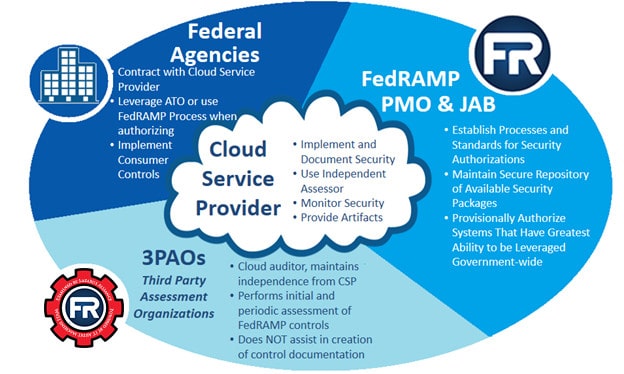
Enterprises cannot self-certify. FedRAMP certification must be performed by a certified third-party assessment organization (3PAO) such as Lazarus Alliance.

According to FedRAMP.gov, the total median cost for a mid-range cloud services provider to attain a FedRAMP certification is $2,250,000. About half of this is for engineering costs, with the other half spent on the process itself. Additionally, providers can expect to spend about $1,000,000 a year on continuous monitoring to maintain an acceptable risk posture.

Lazarus Alliance understands that these costs are out of reach for most small and medium-sized providers, and we think that’s a shame. Our industry-leading FedRAMP 3PAO services will enable you to expand your business into government markets at a price you can afford. We work smarter, not harder, to drive down your costs by giving you access to Continuum GRC’s proprietary IT Audit Machine (ITAM), the number-one ranked FedRAMP-ready SaaS GRC audit software solution. ITAM utilizes pre-loaded, drag-and-drop modules to simplify and accelerate the FedRAMP certification process. Some of our clients have saved up to 1,000% over traditional FedRAMP assessment methods.

The cybersecurity experts at Lazarus Alliance have deep knowledge of the cybersecurity field, are continually monitoring the latest information security threats, and are committed to protecting organizations of all sizes from security breaches. Our full-service risk assessment services and Continuum GRC RegTech software will help protect your organization from data breaches, ransomware attacks, and other cyber threats.

Lazarus Alliance is proactive cybersecurity®. Call 1-888-896-7580 to discuss your organization’s cybersecurity needs and find out how we can help your organization adhere to cybersecurity regulations, maintain compliance, and secure your systems.

Understanding & Preventing Advanced Persistent Threats (APTs)

Understanding & Preventing Advanced Persistent Threats (APTs)

A guide to advanced persistent threats (APTs), a highly sophisticated, highly destructive form of cyber attack.

What is an Advanced Persistent Threat (APT)?

“Advanced persistent threat” is a broad term used to describe a cyber attack where hackers covertly gain access to a system and remain inside it, undetected, for a significant period of time and to achieve a specific goal. Perhaps the most well-known example of an APT is the Stuxnet virus, which infected the Natanz uranium enrichment plant in Iran, slowly, silently, and gradually destroying centrifuges over a long period of time.

Understanding & Preventing Advanced Persistent Threats (APTs)

APTs are highly sophisticated, and the targets are carefully selected and thoroughly researched. They require significant financial resources and the participation of a group of skilled, experienced hackers, so they are usually launched by nation-states or very large organizations. The targets are generally government institutions, critical infrastructure, or very large private-sector enterprises.

The goal of an APT is usually cyberespionage: the theft of valuable intellectual property, sensitive data or communications or, in the case of a government target, classified information. APTs can also be used to steal cash from financial targets, execute full system takeovers or, as in the Stuxnet attack, damage or destroy systems or critical infrastructure.

Characteristics of an Advanced Persistent Threat

What makes an APT different from other cyber attacks?

  • They are custom-tailored to be used against a specific organization for a specific purpose. Most attacks employ malware and methods that work pretty much the same way regardless of who the target is. APTs are designed from the ground-up.
  • They’re not automated. An APT requires a lot of manual work.
  • They’re not “hit and run” attacks; they unfold slowly, over an extended period. Once they infiltrate a system, hackers remain hidden inside, first carefully mapping the system and expanding their footprint, then exfiltrating as much data or doing as much damage as possible.

Advanced persistent threats unfold in stages:

Initial reconnaissance: A target is selected, and the goals of the APT are determined. A team with the appropriate skills is put together, and the target is researched to determine its strengths and weaknesses and to gather information for use in social engineering schemes. An initial infiltration plan is developed.

Infiltration: The target is compromised using malicious uploads, phishing or other social engineering schemes, and/or SQL or RFI injections. To distract security personnel and further weaken defenses, hackers may simultaneously launch a DDoS or another “smokescreen” attack.

Mapping and expansion: Once inside, hackers install a backdoor Trojan to ensure uninterrupted, covert system access. They poke around, exploring the system, mapping its infrastructure, locating the target, and determining the best way of getting to it. They will look for other vulnerabilities that can be exploited and to compromise employees with appropriate access levels.

Exfiltration/execution: The data theft or system damage commences. During the exfiltration process, they may employ another smokescreen to cover their tracks. Multiple attacks/thefts are conducted over a long period.

Detecting & Preventing Advanced Persistent Threats

By their nature, APTs are exceedingly difficult to detect; hackers go to great lengths to cover their tracks and use sophisticated, next-generation malware that evades antivirus software. Warning signs of an APT include:

  • An increase in logins late at night or at other unusual hours. Hackers may be hoping to access the system at times when no one is around.
  • Unexpected data bundles. Hackers often steal data piecemeal, storing it in another part of the system until they have amassed enough to exfiltrate it.
  • Large data flows, to other parts of the system or to external sources, that significantly deviate from the norm.
  • Lots of backdoor Trojans.
  • Spear phishing attacks aimed at high-level employees. This is a red flag that an APT is being planned or is already underway.

Visibility across the enterprise IT environment, including the network and all endpoints, is key to preventing advanced persistent threats. Enterprise networks must be continuously monitored to establish a baseline for system activity and enable security personnel to detect aberrations from that norm. Other preventative measures include:

  • Keeping all systems and software up-to-date.
  • Filtering incoming emails.
  • Improving endpoint security using methods such as 2FA and VPNs.
  • Protecting web applications against attacks such as XSS and SQL injections.
  • Training employees on basic cyber hygiene, including how to spot phishing and other social engineering schemes.

The cybersecurity experts at Lazarus Alliance have deep knowledge of the cybersecurity field, are continually monitoring the latest information security threats, and are committed to protecting organizations of all sizes from security breaches. Our full-service risk assessment services and Continuum GRC RegTech software will help protect your organization from data breaches, ransomware attacks, and other cyber threats.

Lazarus Alliance is proactive cybersecurity®. Call 1-888-896-7580 to discuss your organization’s cybersecurity needs and find out how we can help your organization adhere to cybersecurity regulations, maintain compliance, and secure your systems.

10 Cyber Security Travel Tips to Protect Your Devices & Data

10 Cyber Security Travel Tips to Protect Your Devices & Data

Cybersecurity Travel Tips for Business & Leisure

The holiday season is fast approaching, but hackers don’t take vacations. Whether you’re planning to go home for the holidays or travel for business on a regular basis, make sure to protect yourself from cyber crime with these cybersecurity travel tips.

Cybersecurity Travel Tip #1: Update Your OS & Software

Before you leave, make sure your operating systems and software are up-to-date.

Cybersecurity Travel Tip #2: Take Only What You Need

Do you really need to pack 15 different electronic devices? The more devices you take, the more you’ll have to keep safe from hacking, theft, or accidents.

Cybersecurity Travel Tip #3: Lock Down Your Devices

Make sure that all the devices you are taking are protected with strong passwords, multi-factor authentication, or a biometric lock, and disable any file-sharing capabilities. Avoid taking devices that contain sensitive data. If you are a business traveler, ask your organization about lending you a disposable phone or laptop for use while traveling. If you cannot avoid traveling with a device that contains sensitive data, consider encrypting it using encryption software.

Cybersecurity Travel Tip #4: Beware of Public WiFi

Many airports, hotels, and restaurants offer free, unsecured public WiFi, which poses a multitude of cybersecurity risks. Avoid using these networks; tethering to your phone is a much safer option. If you absolutely must connect to a public WiFi network, follow these best practices from Continuum GRC.

Cybersecurity Travel Tip #5: Don’t Leave Devices Unattended

Lock up any devices left in hotel rooms, and never leave your devices unattended in public areas, not even for a moment. For example, never set your phone down on a counter while you reach into your purse or wallet. When using your devices in public areas – especially crowded ones – conceal your devices as much as possible. Keep them tucked inside interior pockets or hidden inside zippered bags, and make sure those bags never leave your possession.

Cybersecurity Travel Tip #6: Don’t Share Your Location on Social Media

Many social media sites have an option to “check in” to your current locale so that your followers can track you on your trip. The dark side is that hackers can also track your movements and use them to their advantage; for example, breaking into your home, office, or hotel room when they know you’re not there.

Cybersecurity Travel Tip #7: Don’t Share Your Phone

You may be approached by strangers with sob stories about losing their phone (or having it stolen) and needing to borrow yours to call for help. Never let strangers “borrow” your phone or any other device. It takes only a few moments for a skilled cyber criminal to use the occasion to install malware – or to simply run away and disappear into a crowd.

Cybersecurity Travel Tip #8: Don’t Use Bluetooth

Many rental cars allow travelers to connect their smartphones using Bluetooth. However, some vehicles store your personal information, such as your contact list, even after you’ve terminated the connection. Enabling Bluetooth connectivity also leaves your device vulnerable to hackers. Turn off Bluetooth before you leave for your trip, and don’t turn it back on until you get home.

Cybersecurity Travel Tip #9: Turn Off Network Auto-Connect

Many cell phones include a feature that enables them to automatically connect to available WiFi networks. Turn this feature off, not only when you travel but permanently. Telling your phone to automatically connect to any available network leaves you vulnerable to man-in-the-middle attacks.

Cybersecurity Travel Tip #10: Use Credit Cards, Not Debit Cards

Always use a credit card, not a debit card, when paying for hotel rooms or meals or making any other purchases on the road. Point-of-sale systems are major targets for hackers, and if your credit card data is stolen, you have far more recourse to get fraudulent charges refunded than you do with a debit card. This also prevents hackers from getting access to your bank account.

The cybersecurity experts at Lazarus Alliance have deep knowledge of the cybersecurity field, are continually monitoring the latest information security threats, and are committed to protecting organizations of all sizes from security breaches. Our full-service risk assessment services and Continuum GRC RegTech software will help protect your organization from data breaches, ransomware attacks, and other cyber threats.

Lazarus Alliance is proactive cybersecurity®. Call 1-888-896-7580 to discuss your organization’s cybersecurity needs and find out how we can help your organization adhere to cybersecurity regulations, maintain compliance, and secure your systems.